A screen-by-screen tour of the platform in four parts: the six areas of the app, then the lend, borrow, and swap flows, each taken to the final review step.
Every action on the platform follows the same shape: choose a market, set an amount, read the projection, review, then sign in your wallet. This tour shows each screen in that sequence, one flow per tab. If you are setting up for the first time, start with Onboarding and Connect a portfolio; the concepts behind the numbers on these screens are covered in Health factor and Portfolio health score.
Rates, figures, and market parameters shown in these screens are illustrative, not current. Balances shown are small illustrative amounts.
Platform tour
Lend
Borrow
Swap
The sidebar has six areas: Home, Portfolio, Swap, Lend, Borrow, and Transactions, with Account and Docs beneath. Everything you see is scoped to the portfolio selected at the top right of the screen.
Home is the read-at-a-glance view. It shows net equity with its recent history, the portfolio health score, an onchain market ticker, and your active positions.Home for a single portfolio. The health score gauge places this book at 41, the Monitor band.The view is per-portfolio by default. The selector at the top right switches between portfolios, or aggregates every portfolio under your entity into one All Portfolios view, useful when mandates are split across several portfolios and you want the whole book at once.The selector appears on every main screen. Home, Portfolio, and Transactions can be read for one portfolio or entity-wide as All Portfolios; market screens are always per-portfolio.When any borrow position’s health factor falls below the at-risk threshold, the Health Score card carries a warning. Hover it for the specifics.The warning names the problem and the remedy: review the affected positions and deposit additional collateral to reduce their LTV.Below the summary cards, Home lists lend and borrow positions with their key figures (deposited amounts, accrued yield, debt, borrow rate, and per-position health factor), followed by recent transactions.Each borrow position carries its own health factor. A position below 0.80 is flagged At Risk; see Health factor.
Portfolio is the analytical view of the same book. It charts portfolio value and total earnings over time, breaks positions down sortable by health factor, and shows an asset-level view of what the portfolio holds.Positions sorted by health factor put the weakest first, the one to read before the average. The top-right selector switches this page to All Portfolios as well.
Swap converts one asset into another inside a portfolio. Sell and receive amounts quote live, with rate, price impact, and routing shown before you act. In practice its main role is getting holdings into the asset a particular lend or borrow market requires.Swapped assets land where you point them; the receiving portfolio is always explicit.
Lend lists the markets where assets can be supplied to earn interest: featured markets with rate history, your current lend positions, and the full market table with rate, total supply, and total liquidity per market.Utilization and available liquidity matter as much as the rate. See Supply assets.
Borrow lists collateral/debt markets, where each market is an asset pair such as ETH/USDC. Your borrow positions appear with their names, supplied collateral, debt, net rate, and health factor; the market table beneath shows borrow and supply rates, maximum LTV, liquidation threshold, collateral supplied, and the amount borrowable for each pair.Positions are named and numbered. The badges do the triage: At Risk below 0.80, Monitor from 0.80 to 1.20.
Transactions is the full history for the selected portfolio; switch to All Portfolios to widen it to the whole entity. Every action is listed (supplies, collateral deposits, borrows, repayments, withdrawals, and swaps), filterable by market, type, status, and time, each row carrying its portfolio, timestamp, and transaction hash.Every status is spelled out; a Canceled entry is a transaction that never committed. The hash links to the chain record.
This tab shows the screens of the lend flow. The steps without screenshots are in Supply assets, and the rate mechanics are in How yield is calculated.
Open Lend in the sidebar and select the market for the asset you want to supply. The market page shows the figures that should drive the decision (total deposits, available liquidity, utilization, and the current rate) alongside eligibility, minimum deployment, and network, with tabs for the market’s overview, performance, risk parameters, your position, and its transactions.The right-hand panel is where you act: Deposit and Withdraw tabs, amount, and the portfolio the position belongs to.
Enter an amount, or use the balance shortcut to supply your full holding. The panel projects the position before and after (position amount, value, and rate) while you type.Nothing is committed at this point; the projection is there to be read before you continue.Select Continue to reach the review step. Review restates the deposit, the receiving portfolio, and the resulting position.First supply of an asset to a market is two wallet transactions: an approval, then the lend itself. The approval is one-time per asset and market.Confirming from review sends the transaction to your wallet to sign. The position appears once the transaction is confirmed onchain.
The market page’s Your Position tab tracks the position’s amount, current rate, and accumulated earnings.Earnings are shown per position; the same figures roll up on Home and Portfolio.
Open the Withdraw tab, enter an amount or withdraw in full, and continue to review.Available shows what the market can return right now, which is not always your full balance; see Supply assets for why.Review restates the amount, the receiving portfolio, and the position after withdrawal. Confirming sends it to your wallet.
Open Borrow in the sidebar. Each market is a collateral/debt pair with its own risk parameters.Maximum LTV and liquidation threshold differ by pair; the gap between them is your margin for error.
Select the market for your collateral and debt assets. The market page carries the parameters that govern every position in it: maximum loan-to-value, liquidation LTV, liquidation fee, borrow rate, and available liquidity.For a new position only Deposit is active. Collateral comes first, and the remaining actions unlock on the open position.
Enter the collateral to deposit. The panel projects collateral value, health factor, borrowable amount, and liquidation price before you continue.Borrowable amount is what this collateral supports within the market’s maximum LTV.Select Continue to reach review. A position can be named here. Positions are individually named and numbered, so a book of several stays readable.Review restates the collateral, the portfolio, and the projected health factor, borrowable amount, and liquidation price. Confirming sends the deposit to your wallet.
Once open, positions appear on the market’s Your Positions tab and on the Borrow page. Selecting one switches the action panel to that position, with all four actions available: deposit more collateral, borrow, repay, withdraw.Each position stands alone: its own collateral, debt, and health factor. Liquidation happens per position, not per portfolio.The position header shows its name and number; the pencil renames it.
Open the Borrow tab on the position. Available shows the headroom the position’s collateral supports within the market’s maximum LTV. A position already at its limit shows zero until collateral is added or debt repaid.This demonstration position is fully drawn, so available to borrow is zero. Deposit collateral or repay debt to restore headroom.Enter an amount within the available headroom and continue to review, which shows the resulting health factor and liquidation price before anything is signed. Borrowing worsens the health factor; the review shows by how much.
Open the Repay tab. Repayment draws the debt asset from your wallet balance; Repay All clears the position’s debt in one step.Repaying moves the health factor the right way (here from 1.12 to 1.32), and the projection quantifies it before you commit.Review restates the repayment, remaining debt, and resulting health factor. Confirming sends it to your wallet.
Open the Withdraw tab to take collateral out of the position. With debt outstanding, part of the collateral stays locked as backing: the platform refuses any withdrawal that would push the position past the market’s maximum LTV.The guard names the rule and the remedy. Withdraw less, or repay debt first.Within the allowed headroom, the flow matches the others: amount, projection, review, wallet.Withdrawing worsens the health factor; review shows the position after the withdrawal before anything is signed.To close a position entirely, repay the debt in full, then withdraw the collateral.
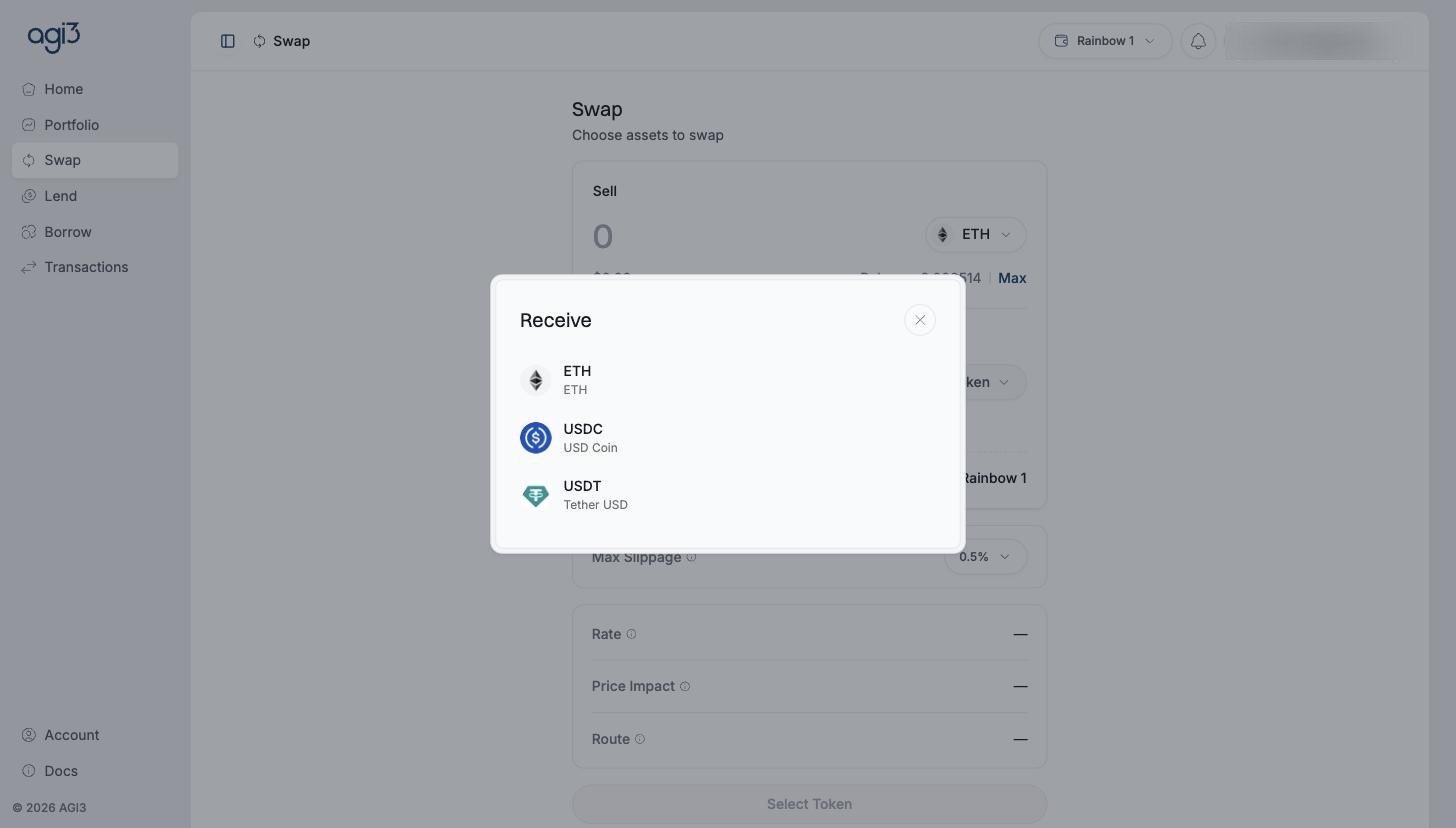
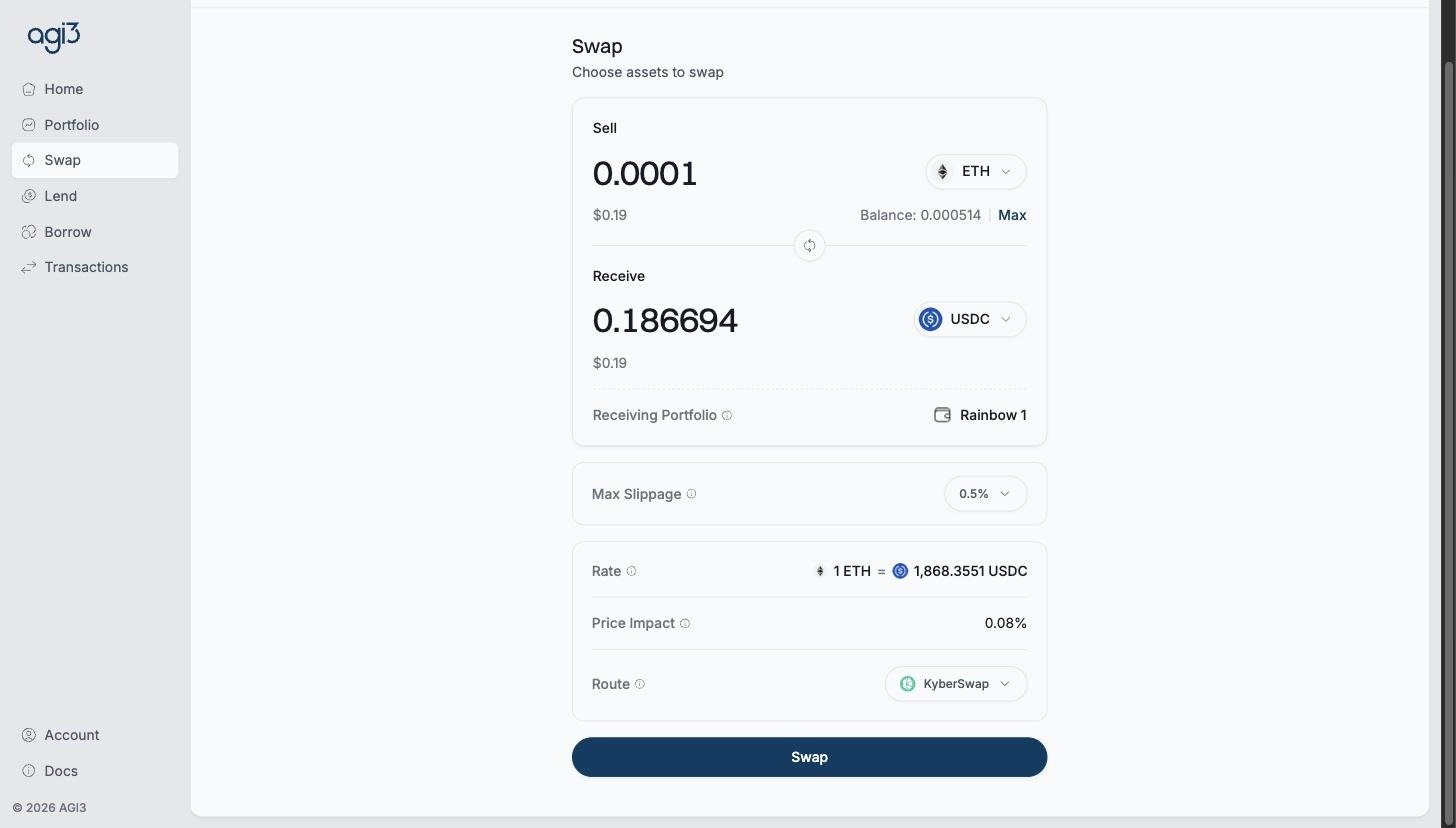
This tab shows the screens of the swap flow. The steps without screenshots are in Swap assets.Open Swap, choose the asset to sell, and select the receive token.Choose the asset the target market requires, such as USDC to repay an ETH/USDC borrow.Enter the amount to sell. The quote fills in live: the receive amount, the rate, price impact, and the route the swap will take, with maximum slippage configurable above.Read price impact and the route before acting. Confirming sends the swap to your wallet, and the received asset lands in the portfolio shown.Once the swap is confirmed onchain, the received asset is available in that portfolio, ready to supply into a lend market, post as collateral, or use to repay debt.